29 — the desktop as MCP tools: an LLM drives it with native tool-calling
Example 28 used a custom (goal, space) -> steps planner. This one removes the planner entirely: urirun projects the noVNC connector's routes to MCP tools (name + inputSchema), the model is handed those tools, and it decides which to call and with what arguments via native tool-calling — a decision loop where the next call depends on the previous result, exactly like a Claude/MCP client.
desktop connector routes ──► MCP tools (name + JSON Schema)  [zero extra code]
        │
        ▼
   tool-calling loop:  model → tool_call → urirun executes on the desktop → result → model → …
        │
        ▼
   generated/mcp-session-report.md  +  screenshot  +  verdict
Run it
./mcp_serve.sh                         # show the MCP tools/list + A2A card (no LLM)
python3 mcp_agent.py                    # the model drives the desktop via tool-calling
mcp_agent.py needs Docker and a tool-capable model (default openrouter/openai/gpt-4o-mini; override with URIRUN_MCP_MODEL). The configured LLM_MODEL in urirun/.env is an image model and does not support tool use — hence the separate default here.
What actually happened (recorded live)
NL goal: *"On the desktop, open a terminal and run a command that prints 'mcp drove this desktop', then take a screenshot. Stop the session when done."* — the model called the tools itself, filling each call's arguments from the tool's JSON Schema:
| # | tool → uri | ok | arguments (model-filled) |
|---|---|---|---|
| 0 | desktop_novnc_session_command_start → …/session/command/start | ✓ | {} |
| 1 | desktop_novnc_app_command_launch → …/app/command/launch | ✓ | {"command": "lxterminal"} |
| 2 | desktop_novnc_input_command_type → …/input/command/type | ✓ | {"text": "echo 'mcp drove this desktop'", "enter": true} |
| 3 | desktop_novnc_screen_query_screenshot → …/screen/query/screenshot | ✓ | {"name": "screenshot"} |
| 4 | desktop_novnc_session_command_stop → …/session/command/stop | ✓ | {} |
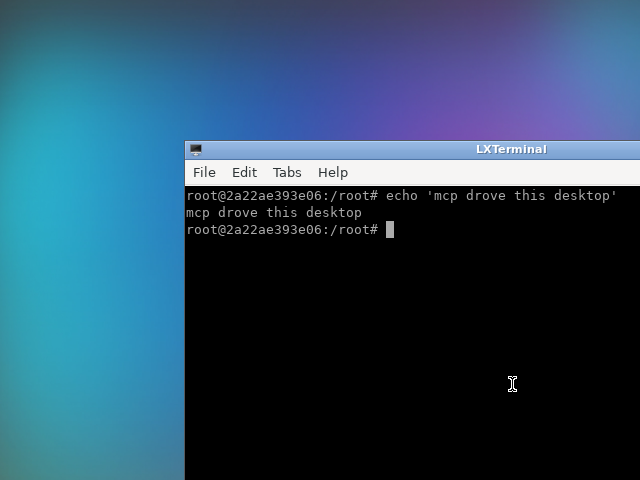
The terminal shows echo 'mcp drove this desktop' → mcp drove this desktop. Intention realized: YES — every tool call succeeded and the screenshot was captured. Full record: generated/mcp-session-report.md + .json.
Why this is the simplest LLM adaptation
There is no planner and no prompt engineering of a plan format — the model uses its built-in tool-calling. urirun already supplies the only thing MCP needs: each route as a tool with a JSON-Schema parameters object (v2_mcp.to_mcp_tools). So:
./mcp_serve.shshowsurirun … mcp tools(tools/list) and the A2A card — the
zero-code surface. Point any MCP client (Claude Desktop, etc.) at python3 -m urirun.v2_mcp serve <registry> --execute and it can call these tools.
mcp_agent.pyruns that client loop in-process via liteLLM:to_mcp_tools→
function tools → execute each call with v2_mcp.call_tool (which goes through the same policy-gated urirun.run).
MCP tool names carry the operation
v2_mcp.tool_name builds the name from all URI path segments, so the operation is always in the name: …/session/command/start → desktop_novnc_session_command_start, …/screen/query/screenshot → desktop_novnc_screen_query_screenshot. (Earlier it used only resource+verb and dropped the operation — that was fixed alongside this example.) Combined with each tool's description (the route label) and JSON-Schema parameters, tool selection is unambiguous.
Core vs connector (unchanged from 28)
Nothing new in core was needed for this example — the MCP projection (v2_mcp.to_mcp_tools / serve_mcp) and the schema-in-action-space already existed. The desktop driver stays a connector; core just *describes and routes* it.
Files
mcp_agent.py— MCP-style tool-calling loop driving the desktop (liteLLM).mcp_serve.sh—urirun mcp tools+ A2A card; how to run the stdio MCP server.test_mcp_agent.py— offline (tools + schema + index) + opt-in live (URIRUN_NOVNC_LIVE=1).docs/screenshot.png— the recorded session result.- Reuses the
novnc_connectorfrom../28-llm-novnc-desktop.